我们知道,在创建线程时,会用到pthread_create()函数 ,我们来简单介绍一下该函数:
pthread_create(线程的tid , 线程属性 , 工作函数名 , 函数需要的参数);
这篇博客要讲的线程属性,便是用于进行线程的初始化的,我们可以通过对线程属性的修改来自定义线程
接下来我们来了解一下什么线程属性
一、线程属性中的成员 线程属性是一个结构体,用法为 pthread_attr_t 变量名(本篇博客里默认变量名为attr)
线程属性结构体中的成员分别有:线程的警戒缓冲区、线程的优先级指针、线程的退出状态、线程栈地址、线程栈大小
接下来,我们来介绍一下该结构体中的这几个成员
线程的警戒缓冲区
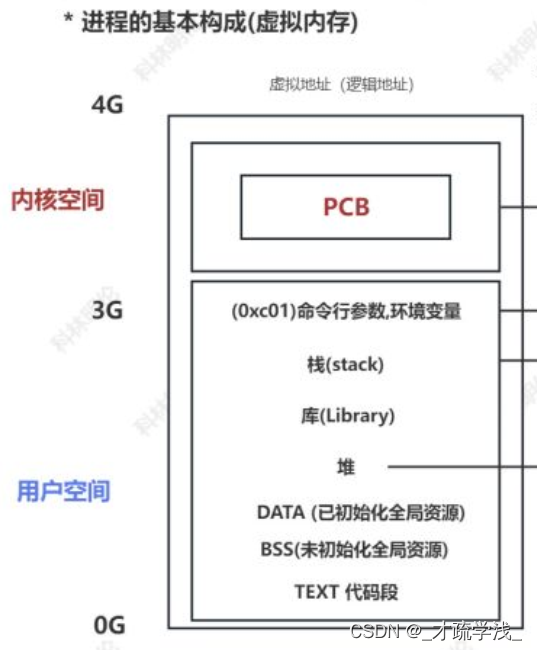
一旦栈发生溢出,数据就会向上覆盖,影响甚至破坏到库、栈区等空间中的数据。但更可怕的是,由于用户对用户空间中的内容具有读写权限,线程栈上溢所导致的对这些内容的修改,系统是不会报错的,只有当数据溢出到内核层时,我们才能够发现问题,但此时已经晚了,数据已经全被破坏了,所以我们需要来给每个线程栈“加个盖子”,也就是所谓的“警戒缓冲区”。
警戒缓冲区的大小一般为4K,这块内存是不可读写的,所以当线程栈发生上溢,想要修改这块内存中的内容时,系统就会发现有线程非法操作内存,并杀死该线程,这样就可以保护其他内存中的数据
线程的优先级指针
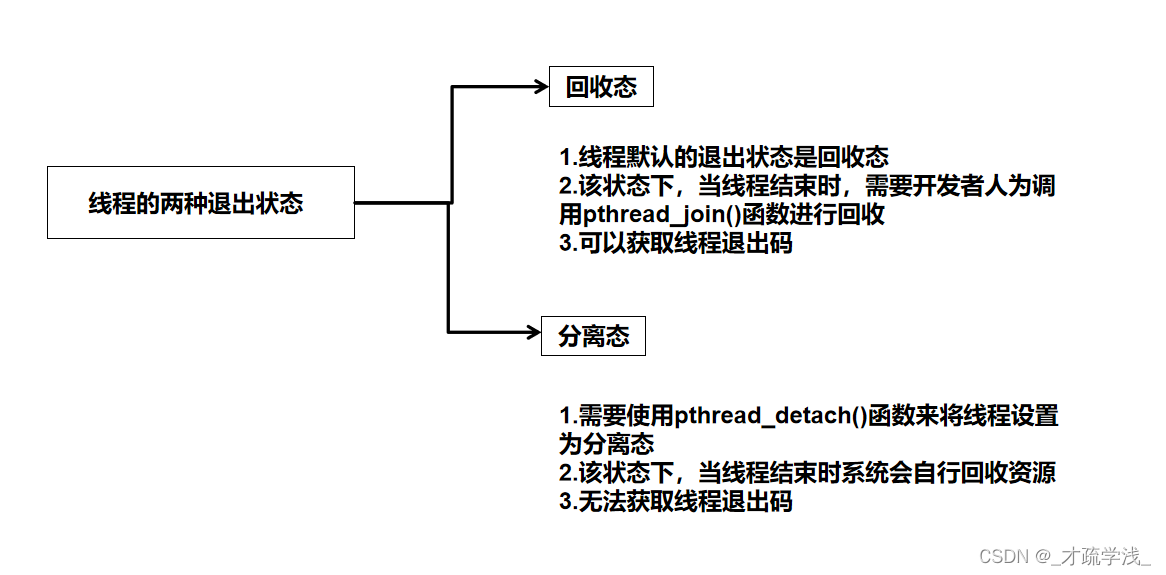
二、线程退出状态 线程的退出状态有两种,分别是回收态(PTHREAD_JOINABLE)和分离态(PTHREAD_DETACH)
线程栈地址
线程栈大小
三、修改线程属性的相关函数 在了解了线程属性的组成之后,我们就要来了解一下修改线程属性的相关函数了
先介绍下一会会用到的几个变量:
pthread_attr_t attr ; //定义一个线程属性结构体
int exit_state ; //线程属性中的退出状态
void* thread_stack_addr ; //线程属性中的线程栈地址
size_t thread_stack_size ; //线程属性中的线程栈大小
函数
功能
返回值
pthread_attr_getdetachstate(&attr , &exit_state);
exit_state作为传出参数,可以获取线程属性中的退出状态
回收态返回 PTHREAD_CREATE_JOINABLE
pthread_attr_setdetachstate(&attr , exit_state);
通过传入参数exit_state,设置线程属性中的退出状态
成功返回0,失败返回非0错误码
pthread_attr_getstack(&attr , &thread_stack_addr , &thread_stack_size);
thread_stack_addr、thread_stack_size作为传出参数,可以获取线程属性中的栈地址与栈大小
返回两个参数——线程栈地址与线程栈大小
pthread_attr_setstack(&attr , thread_stack_addr , thread_stack_size);
通过传入参数thread_stack_addr、thread_stack_size,可以设置线程属性中的栈地址与栈大小
成功返回0,失败返回非0错误码
pthread_attr_init(&attr);
初始化线程属性结构体
成功返回0,失败返回-1
pthread_attr_destroy(&attr);
释放线程属性结构体内存
成功返回0,失败返回-1
四、修改线程属性的具体实现 接下来,我们可以根据这些函数来实际操作一下,完成以下两个小任务
获取线程属性中默认的退出状态(难度:⭐)
1、获取线程属性中默认的退出状态,以下是代码实现
1 2 3 4 5 6 7 8 9 10 11 12 13 14 15 16 17 18 19 20 21 22 23 24 25 26 27 28 29 30 #include <stdio.h> #include <stdlib.h> #include <unistd.h> #include <string.h> #include <sys/types.h> #include <sys/stat.h> #include <pthread.h> #include <fcntl.h> int main () pthread_attr_t attr;int detach_status;if (detach_status == PTHREAD_CREATE_JOINABLE)printf ("线程属性默认为回收态\n" );else printf ("线程属性默认为分离态\n" );printf ("进程退出!\n" );
怎么样,是不是很简单呢? 接下来,我们来完成第二个小任务
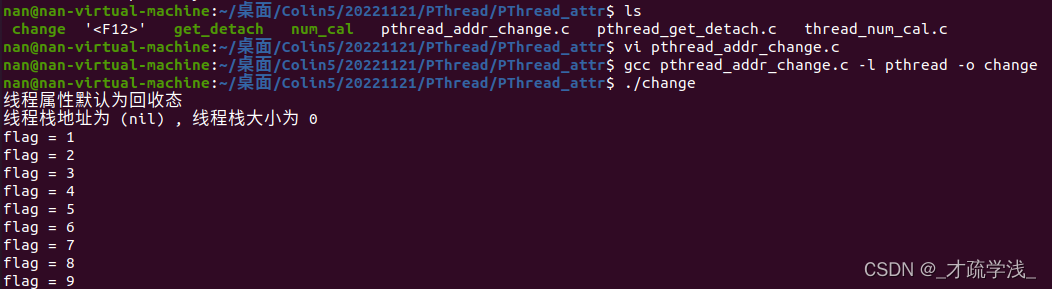
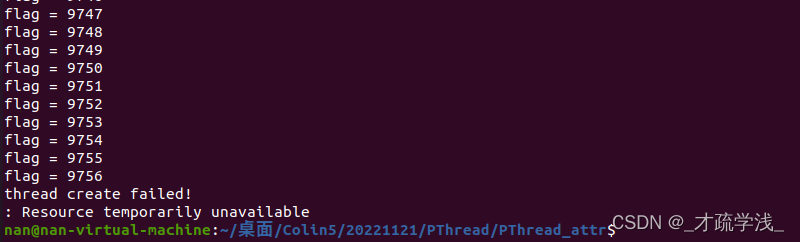
2、获取默认状态下线程属性中的线程栈地址与大小。将线程属性中的退出状态设置为分离态,修改线程栈地址,修改线程栈大小为1M,并测试使用这种线程属性的线程,系统一共能够创建多少个,以下是代码实现
1 2 3 4 5 6 7 8 9 10 11 12 13 14 15 16 17 18 19 20 21 22 23 24 25 26 27 28 29 30 31 32 33 34 35 36 37 38 39 40 41 42 43 44 45 46 47 48 49 50 51 52 53 54 55 56 57 58 59 60 61 62 63 64 65 66 67 68 69 70 71 72 73 74 75 #include <stdio.h> #include <stdlib.h> #include <unistd.h> #include <string.h> #include <sys/types.h> #include <sys/wait.h> #include <sys/stat.h> #include <pthread.h> #include <fcntl.h> void * thread_jobs (void * arg) while (1 )sleep (1 );pthread_exit (NULL );int main () pthread_attr_t attr;pthread_attr_init (&attr);int detach_status;pthread_attr_getdetachstate (&attr , &detach_status);if (detach_status == PTHREAD_CREATE_JOINABLE)printf ("线程属性默认为回收态\n" );else printf ("线程属性默认为分离态\n" );pthread_attr_setdetachstate (&attr , PTHREAD_CREATE_DETACHED);void * thread_stack_addr;size_t thread_stack_size;pthread_attr_getstack (&attr , &thread_stack_addr , &thread_stack_size);printf ("线程栈地址为 %p , 线程栈大小为 %d \n" , thread_stack_addr , (int )thread_stack_size);pthread_t tid;0x100000 ;int flag = 0 ;int errno;while (1 )if ((thread_stack_addr = (void *)malloc (thread_stack_size)) == NULL )perror ("thread_addr malloc failed!\n" );exit (0 );pthread_attr_setstack (&attr , thread_stack_addr , thread_stack_size);if ((errno = pthread_create (&tid , &attr , thread_jobs , NULL )) > 0 )perror ("thread create failed!\n" );exit (0 );else printf ("flag = %d\n" ,flag);pthread_attr_destroy (&attr);return 0 ;
结果如下图所示:
五、pthread 亲和性设置 1、pthread_attr_setaffinity_np 函数原型:
1
2
int pthread_attr_setaffinity_np (pthread_attr_t *attr, size_t cpusetsize, const cpu_set_t *cpuset) ;
attr:指向线程属性对象的指针。
cpusetsize:CPU 亲和性集合的大小(以字节为单位)。
cpuset:指向 CPU 亲和性集合的指针,其中包含要绑定线程的 CPU。
返回值:成功返回 0,失败返回错误代码。
用于设置线程的 CPU 亲和性(CPU Affinity)。
它允许将线程绑定到特定的 CPU 核心或 CPU 集合上,以控制线程在哪些 CPU 上运行。
2、pthread_setaffinity_np 函数原型:
1
2
int pthread_setaffinity_np (pthread_t thread, size_t cpusetsize, const cpu_set_t *cpuset) ;
thread:要设置 CPU 亲和性的线程标识符。
cpusetsize:CPU 亲和性集合的大小(以字节为单位)。
cpuset:指向 CPU 亲和性集合的指针,其中包含要绑定线程的 CPU。
返回值:成功返回 0,失败返回错误代码。
用于设置线程的 CPU 亲和性(CPU Affinity)。
它允许将线程绑定到特定的 CPU 核心或 CPU 集合上,以控制线程在哪些 CPU 上运行。
示例1(推荐)
1 2 3 4 5 6 7 8 9 10 11 12 13 14 15 16 17 18 19 20 21 22 23 24 25 26 27 28 29 30 31 32 33 34 35 36 37 38 39 #define _GNU_SOURCE #include <stdio.h> #include <pthread.h> #include <unistd.h> #include <sched.h> void *thread_func (void *arg) 10000 );cpu_set_t cpuset;sizeof (cpu_set_t ), &cpuset);for (int i = 0 ; i < CPU_SETSIZE; i++) {if (CPU_ISSET(i, &cpuset)) {printf ("thread is running on cpu %d\n" , i);return NULL ;int main () {pthread_t tid;pthread_attr_t attr;cpu_set_t mask;1 , &mask);sizeof (mask), &mask);NULL );NULL );return 0 ;
示例2:本示例演示了如何在创建线程后限制其只能在 cpu0 1 2 上运行。
1 2 3 4 5 6 7 8 9 10 11 12 13 14 15 16 17 18 19 20 21 22 23 24 25 26 27 28 29 30 31 32 33 34 35 36 37 #define _GNU_SOURCE #include <stdio.h> #include <pthread.h> #include <unistd.h> #include <sched.h> void *thread_func (void *arg) 10000 );cpu_set_t cpuset;sizeof (cpu_set_t ), &cpuset);for (int i = 0 ; i < CPU_SETSIZE; i++) {if (CPU_ISSET(i, &cpuset)) {printf ("thread is running on cpu %d\n" , i);return NULL ;int main () {pthread_t tid;cpu_set_t mask;0 , &mask);1 , &mask);2 , &mask);NULL , thread_func, NULL );sizeof (mask), &mask);NULL );return 0 ;